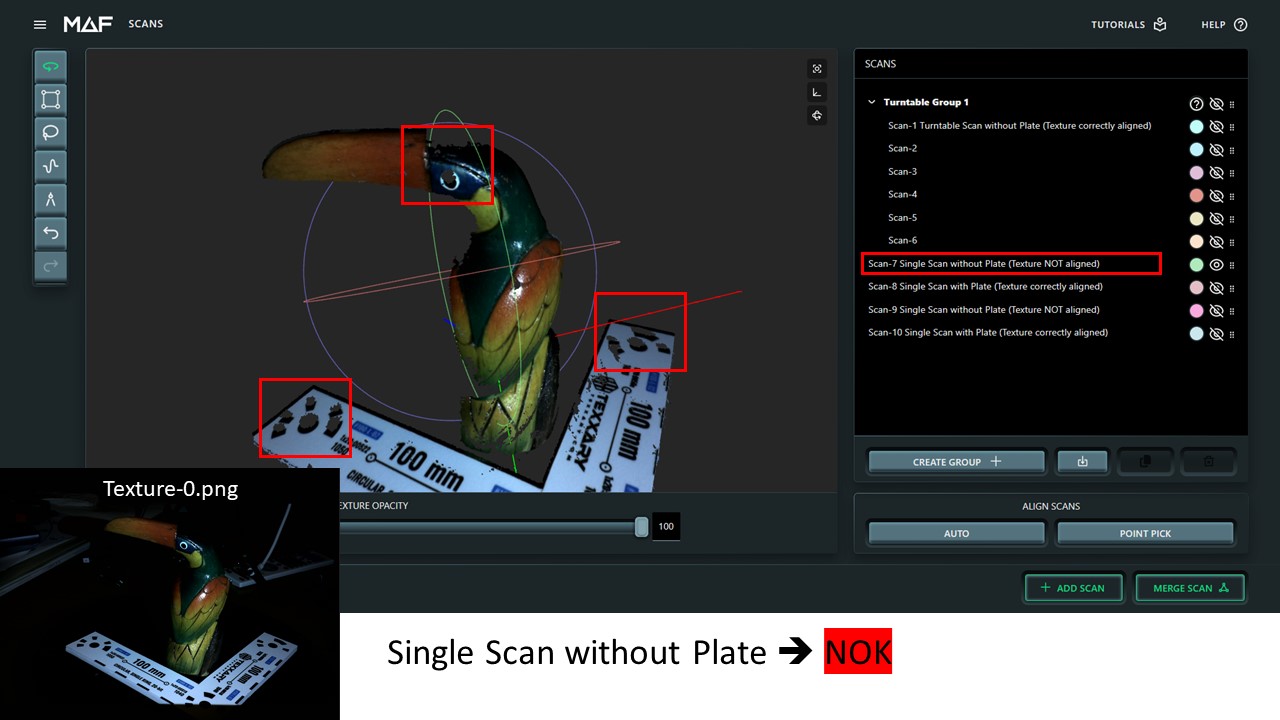
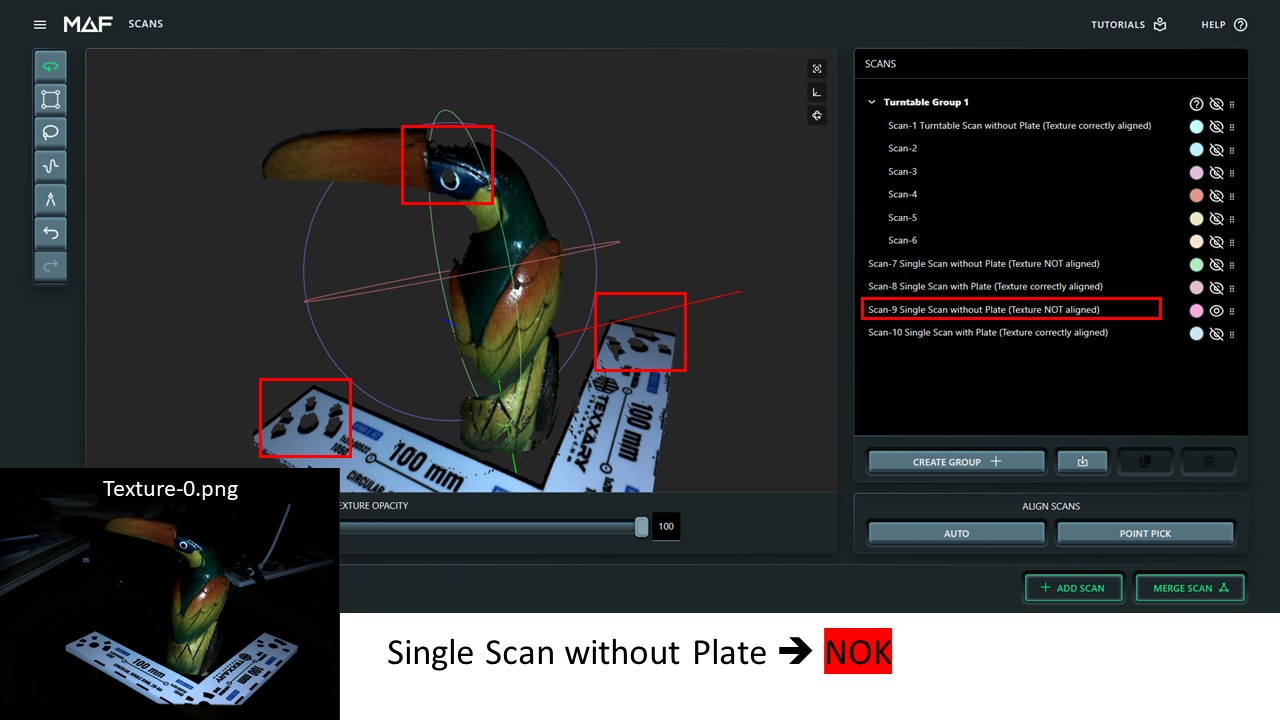
Texture from single scan not correctly aligned


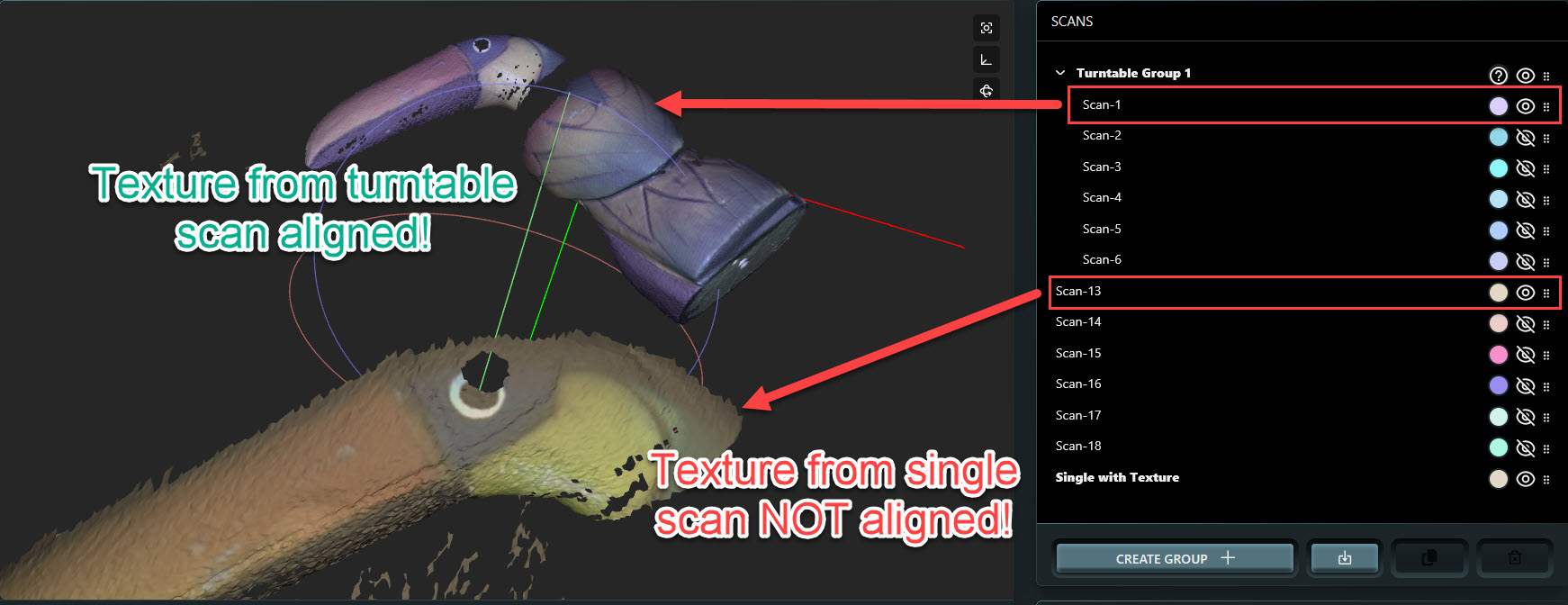
  • I have realized that texture from single scans (turntable off) are not correctly aligned to the mesh while the texture taken with turntable are correctly aligned. Even when the mesh afterwards from single scans are propperly aligned (almost no difference to turntable scan) the final texture from single scans are totally misaligned.

    The hole in this example should be the black eye. I see this in many other scans as well so it's not single occurance. From my perspective it looks like a bug for texture alignment in single scan. Maybe some texture correction algorythm is not applied in single scan but in turntable scan?


  • Hey Christian,

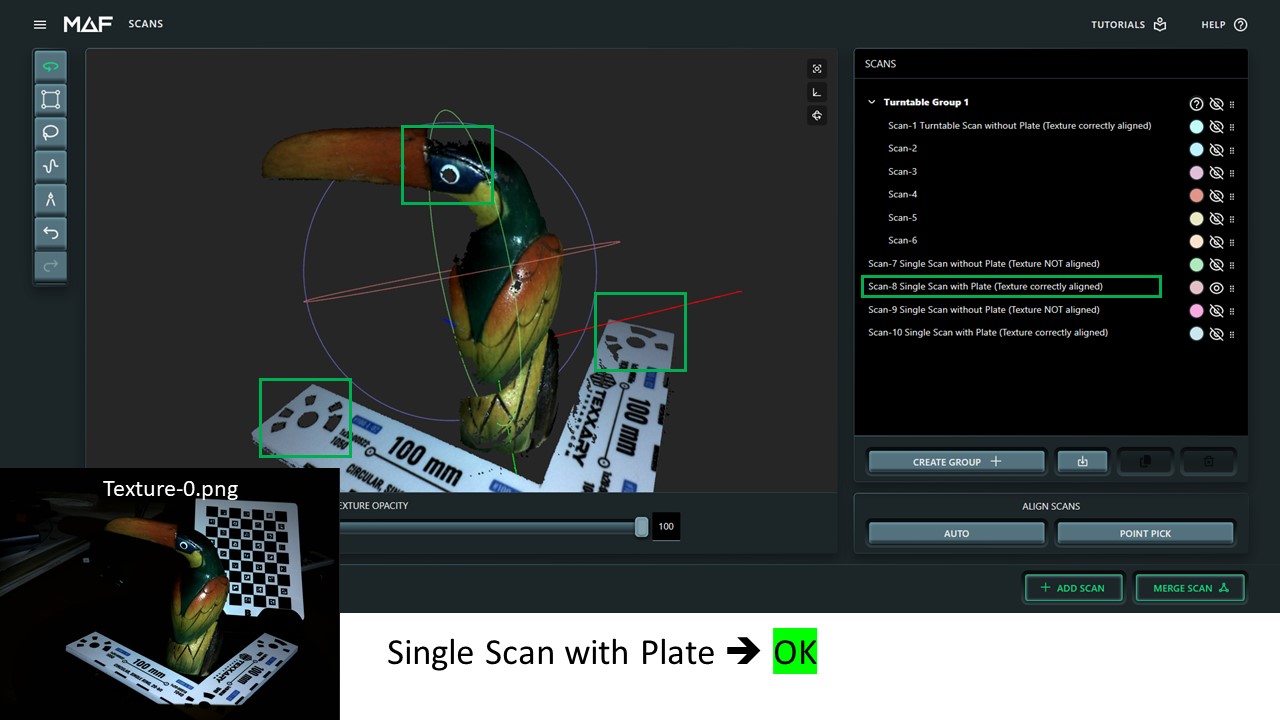
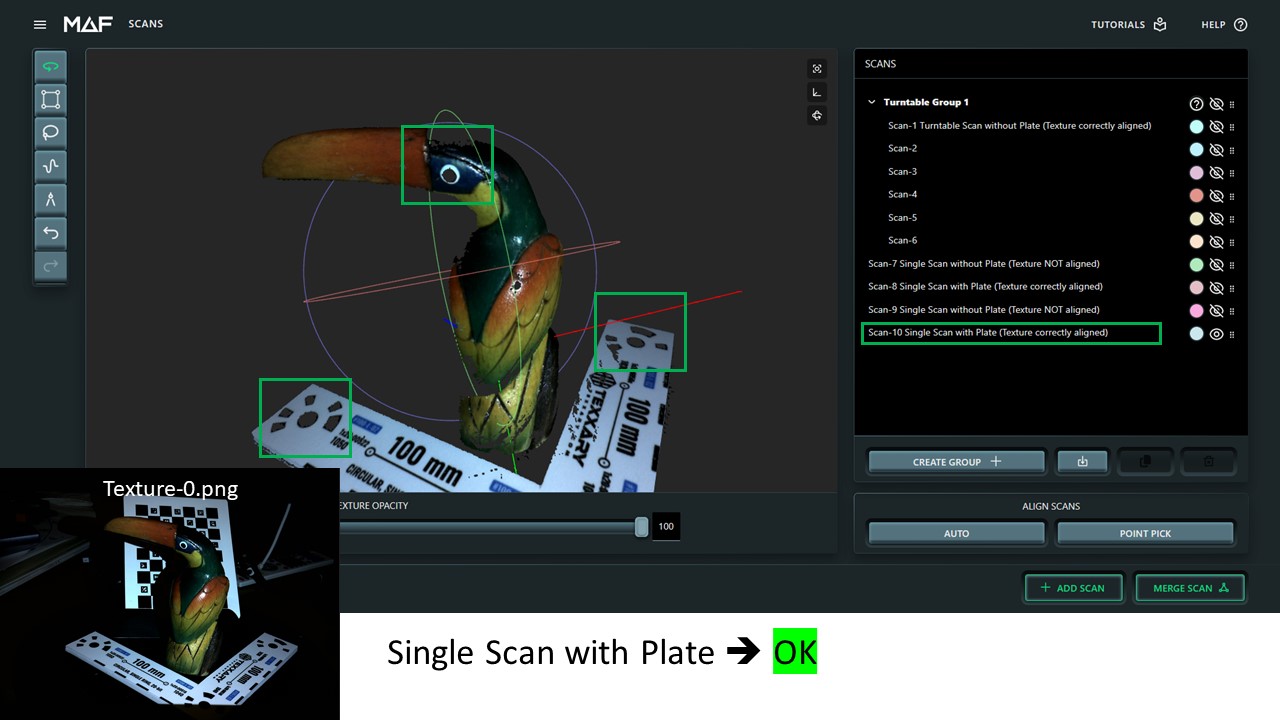
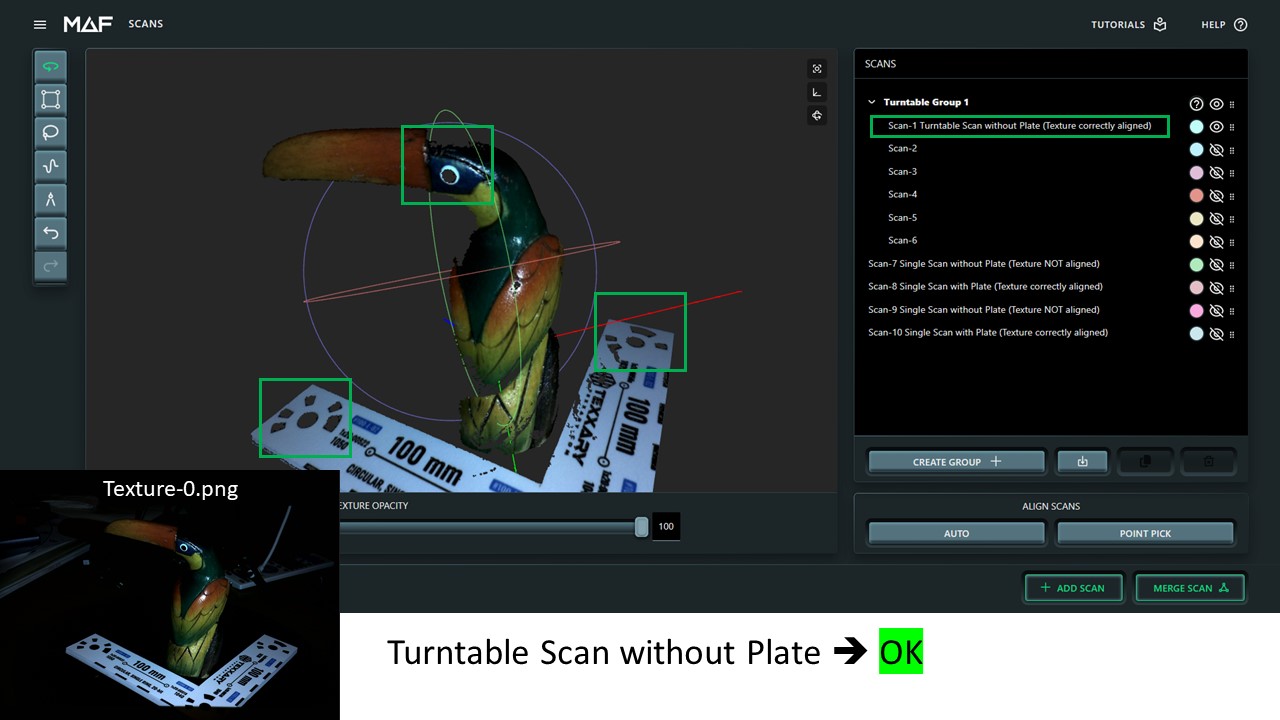
    Can you try a quick test for me? When you do a single scan, put one of the calibration cards in the scene so it's visible from both cameras. You don't have to scan the card, just that the card is mostly visible from both cameras and post the results.


  • Hi Drew,

    here the results from quest test with calibration card. With calibration card on single shot the texture is aligned. :-) 

    The funny thing is that when removing the card with next scan it's again misaligned. In turntable mode the calibration information seems to be saved but in single shot not. Usually user starts with turntable mode and then adds some single short from missing area. The information from turntable calibration should be also saved and used in single shot mode without turntable. Or even better ... the last info from any calibration board information should be saved and used for next scans. But this is very good information and gives me hope that the issue will be fixed soon. ;-)

    Many thanks for excellent support so far !!!

  • Hi Christian,
    When you scan with a turntable, or with the card in the scene, the camera calibrations is refined. The unit you have seems like it's out of calibration. This could be from vibrations, being dropped, or even extreme temperature changes. 

    Scanning with the card in the scene is my suggested solution for you going forward; for even a well calibration machine will get the best scans this way.

    Recalibration of the cameras is unfortunately not a pleasant experience. But I will provide the instructions here below if you choose this route. 

    A note to everyone else who is reading this: Recalibrating your unit is NOT RECCOMMENDED. Please do not attempt this without explicit instruction from customer service. If you do attept this and alignments or scales are off, you can try again, or do a factory reset to return the unit to the factory calibration.


    To Calibrate the unit, you will need the LARGE calibration card that comes with the unit. 

    1) Very important: Make sure the unit is updated to the most recent software


    2) Using a stable tripod, set up the THREE on a stable desk, so that it is facing you (projecting towards you).

    3) Get into a seated position, preferably in a chair with arm rests. 

    4) Then navigate to matterandform.local/cameraCalibration

    5) Follow the on-screen instructions to match the calibration card angle and distance to the on screen overlay. 

    Tips:

    - Start by lining the card so it is straight on to the camera (no perspective).

    - Turn the card angle in one single direction (tilt up, down, left or right).

    - Try to match the angle of the card by looking at the overlay lines. Don't worry about the size being different at first

    - After you feel you've matched the angle, then slide the card towards or away from the cameras to match the size.

    - There is margin for both angle and distance of the card from the "Perfect" position. If possible, try to bias your distance so that the card is in focus. 


  • Hi Drew, to be very clear. I bougth the device new 4 weeks ago from very relieable german online store. The unit was not dropped from my side and is used in normal heated office. I almost fell off my chair when I read your answer. Scanning always with card in the scene to get texture propperly aligned with mesh is definetely not an acceptable solution.

    After more than 1h of calibration i reached 17/57. This is the most difficult calibration i have ever seen and i would not recommend anybody to do this. All the structured light scanner i know (David/HP SLS, FlexScan3, Shining3d Transcan C, Rangevision) require only few images for calibration and do not require extremely precise position of the calibration plate. You definetely must improve the calibration process to be more user friendly. Otherwise the people might have bricks after some time because recalibration is always required after some time. Also some information with drawing about distance and tilt of calibration plate to the scanner could help to make the calibration process easier. Or YouTube video showing the process. I am not complaining about the need of calibration, i am complaining about the method and difficulty and not beeing described.

    I somehow do not understand why you cannot store the information from turntable calibration and use it for single scan.

    What's your propsal about the next steps to get working MAF3 scanner? Return the device?


  • Hi Christian,

    The calibration process is not easy, you're right, which is why the scanner is calibrated in the factory using a robotic arm. It's possible to do it on your own, but we don't ask our customers to do it as part of the regular usage of THREE, and as Drew wrote in bold, we actively discourage people from trying it. That is why there is no link in the software for it. It is very rare that it's required. Our hypothesis is that somehow your scanner has got into that rare state and it's worth trying.

    However, there is every possibility that you can fix your texturing issue by resetting your scanner. If you go into the menu, you'll see "Reset Scanner" at the bottom. Click on that and you'll get the following modal: 
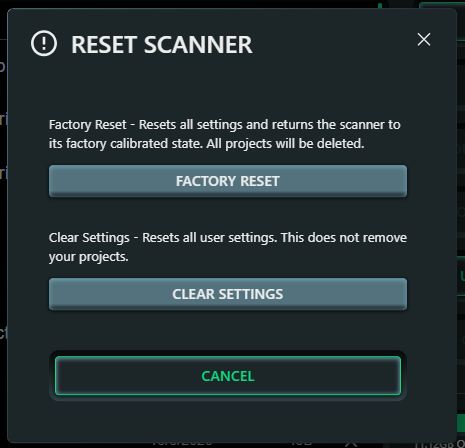
    Press "Clear Settings" and then try a texture single shot scan without the calibration card present in the scanner's view. This may well fix your problem. If it doesn't, then you can try Factory Reset, but make sure you download any scan projects you want to keep first because as you can see in the graphic they will be deleted by Factory Reset.

    Regarding storing the turntable calibration and using it for single scan, the issue is that they're different calibrations. Turntable calibration identifies the turntable position. The camera calibration is a separate calibration (which is done in the factory by the robotic arm) and is used in addition to the turntable calibration during a turntable scan. The two are used together. When you do a single shot scan, the turntable position is irrelevant. We provide the ability to include the calibration card in the view of the scanner for single shot scans for extra accuracy, but it is not a requirement. It's an option. 

    Please try clearing your settings/factory reset and let us know how it goes. 

    Trevor.


  • Hi Trevor,

    thanks for reply. Meanwhile i have managed to pass the calibration procedure taking the super picky positioned 57 images from different height, position, tilt and rotation angle. It took me more than 2 hours! It would help a lot to provide information about the appx distance, tilt (-45°, 0°, +45°) and rotation degree (-X°, 0°, +X°). It's really not userfriendly process and should be made easier (=more user friendly). It's just a matter of time that every 3d scanner need to be re-calibrated. Mine even immediately after taking out first time from the box. Make a video, include info about distance, tilt and rotation degree. This will help a lot! 

    Also you should think about reducing the required amount of images. But the even more important would be to be less picky in the positioning. Just for comparison with other structured light scanner:

    • Shining3d Transcan C requires 10x images from calibration card with mat showing distance and rotation.
    • FlexScan3d requires 12x images from calibration card. Very similar process to MAF3 but much less images and not picky to position at all. The more images with different distances and rotation is done the better the final calibration status results at the end.
    • HP 3D Scan S3 requires only one image, but it has very special angular calibration board.
    • Rangevision requires only 8x images from calibration card. 


    Texture for single scan looks aligned now also for single scan. :-) But there seems to be still very small difference between with/without calibration card in the scene.

    The purpose of the turntable calibration is clear to me. But while turntable calibration the calibration card is visible to the scanner and THREE can take this information AND STORE THIS to be also available for later single scans. Easy and doable, no rocket science from my pov. You might already do this for each scan from turntable scan because here the texture was always correctly aligned even the calibration card was not present in the scene.

    Whenever the focus of the cameras are changed, the calibration (recognize the calibration card at least once) must be done again because fov is slightly changing. I would even prefer to get forced putting the calibration card once after changing the focus. If you store this information i see no technical reason to ask user to put the calibration plate in the scene for higher accuracy of single scan. 

    How do you deal with changed focus for single scans? While it's nice to have auto focus it must create even more problems for correct calibration of the cameras. And that's the reason why structured light scanner usually have fixed focus and they strictly tell you not to change it, otherwise re-calibration is needed. And from technical perspective it makes totally sense. I assume you are doing this based on some calculations based on the calibration which show some step wise focus information (300, 350, 400, 450, ...). Would be interesting to know if/how you are doing this and if my proposal above would be good idea having more precise calibarion of the cameras without the need to put calibration card to the scene.

    BTW ... i really love the THREE scanner. The form factor, easy to use and API are brilliant. I think the capability of the scanner could be even much more, as it already is. Much more! All my questions, asks and complaints are just to make the scanner even better. For me and all other users as well! The more the vendor supports this ... the better for all of us.


Please login to reply this topic!