- Forum
- Community
- THREE API and Programming
- Using ScanData functionality
Using ScanData functionality
-
I would like to download all scan data including the images captured from the stripe pattern.
It it possible to get this images using the ScanData functionality?
Please provide example for ScanData for use with javascript.
Whole project file data via API is working fine but i do not get ScanData working.
Thanks for help.
3
Posts278
Views
-
Hi Christian Gassner
The scanData is used for downloading the 3D data of a scan (vertex, normals etc) and does not include images (other than textures).
The pattern images are not stored on the device after capture and processing, so it's not possible to download then from a project. However you can simulate the result by turning on the projector and setting the projector pattern in the settings. Then you can use download the image from the cameras, change the pattern and repeat.I hate to do this, but I'm going to share untested code with you. I'm not near my scanner to test this for you but wanted to get you something to work with... apologies for the vibe coding.
scanner-control.js
const THREE = require('./three');
const fs = require('fs');
const path = require('path');

// Configuration
const CONFIG = {
    scannerUrl: 'ws://matterandform.local:8081',
    projectIndex: 0, // Use existing project at index 0
    outputDir: './output',
    projector: {
        brightness: 0.8,
        pattern: {
            orientation: 0,  // 0=Horizontal, 1=Vertical
            frequency: 3,    // Pattern frequency [0-8]
            phase: 0         // Pattern phase [0-2]
        }
    },
    camera: {
        selection: [0, 1],  // Both cameras
        exposure: 18000,
        analogGain: 256,
        digitalGain:  256
    },
    capture: {
        selection: [0],     // Just camera 0 for image
        codec: 0,           // 0=jpg, 1=png, 2=bmp, 3=raw
        grayscale: false
    },
    scanData: {
        index: 0,           // First scan in project
        buffers: [0, 1, 2], // 0=Position, 1=Normal, 2=Color
        metadata: []
    }
};

// Create output directory
if (!fs.existsSync(CONFIG.outputDir)) {
    fs.mkdirSync(CONFIG. outputDir, { recursive: true });
}

async function main() {
    const three = new THREE(CONFIG.scannerUrl);

    try {
        console.log('╔══════════════════════════════════════════╗');
        console.log('║  Matter and Form V3 Scanner Control     ║');
        console.log('╚══════════════════════════════════════════╝\n');

        // Step 1: Connect
        console.log('📡 Connecting to scanner...');
        await three.connect();
        console.log(`✓ Connected to ${three.url}\n`);

        // Step 2: Open project
        console. log(`📂 Opening project (index: ${CONFIG.projectIndex})...`);
        const project = await three.send({
            Index: three.taskIndex++,
            Type: "OpenProject",
            Input: CONFIG.projectIndex
        });
        console.log(`✓ Project opened: "${project.name || 'Unnamed'}"`);
        console.log(`  - Index: ${project.index}`);
        console.log(`  - Groups: ${JSON.stringify(project.groups?. name || 'N/A')}\n`);

        // Step 3: Configure projector with pattern
        console.log('💡 Configuring projector.. .');
        const projectorResult = await three.send({
            Index: three.taskIndex++,
            Type: "SetProjector",
            Input: {
                on: true,
                brightness:  CONFIG.projector.brightness,
                pattern: CONFIG.projector.pattern
            }
        });
        console.log('✓ Projector ON');
        console.log(`  - Brightness: ${projectorResult. brightness?. value || CONFIG.projector.brightness}`);
        console.log(`  - Pattern:  Orientation=${CONFIG.projector.pattern.orientation}, ` +
                    `Freq=${CONFIG.projector.pattern. frequency}, ` +
                    `Phase=${CONFIG.projector.pattern.phase}\n`);

        // Step 4: Configure cameras
        console.log('📷 Configuring cameras...');
        const cameraResult = await three.send({
            Index: three.taskIndex++,
            Type: "SetCameras",
            Input: CONFIG.camera
        });
        console.log('✓ Camera settings applied');
        console.log(`  - Exposure: ${cameraResult.exposure?.value || CONFIG.camera.exposure}`);
        console.log(`  - Analog Gain: ${cameraResult.analogGain?. value || CONFIG.camera.analogGain}`);
        console.log(`  - Digital Gain: ${cameraResult.digitalGain?. value || CONFIG.camera.digitalGain}\n`);

        // Step 5: Capture image with projector ON
        console.log('📸 Capturing image...');
        const captureResult = await three.sendWithBuffer({
            Index: three.taskIndex++,
            Type: "CaptureImage",
            Input: CONFIG.capture
        });

        if (captureResult.buffer) {
            const timestamp = new Date().toISOString().replace(/[:.]/g, '-');
            const filename = `capture-${timestamp}.jpg`;
            const filepath = path.join(CONFIG. outputDir, filename);
            fs.writeFileSync(filepath, captureResult.buffer);
            console.log(`✓ Image saved:  ${filepath}`);
            console.log(`  - Size: ${(captureResult.buffer. length / 1024).toFixed(2)} KB`);
            if (captureResult.output && captureResult.output.length > 0) {
                const imgInfo = captureResult.output[0];
                console.log(`  - Dimensions: ${imgInfo.width}x${imgInfo.height}`);
                console.log(`  - Camera: ${imgInfo.camera}`);
            }
        } else {
            console.log('⚠ No image buffer received');
        }
        console.log();

        // Step 6: Turn projector OFF
        console.log('💡 Turning projector OFF.. .');
        await three.send({
            Index: three.taskIndex++,
            Type: "SetProjector",
            Input: {
                on: false,
                color: []
            }
        });
        console.log('✓ Projector OFF\n');

        // Step 7: Download scan data
        console. log('📦 Downloading scan data...');
        const scanResult = await three. sendWithBuffer({
            Index:  three.taskIndex++,
            Type: "ScanData",
            Input: CONFIG.scanData
        });

        if (scanResult.buffer) {
            const timestamp = new Date().toISOString().replace(/[:.]/g, '-');
            const filename = `scandata-${timestamp}.bin`;
            const filepath = path.join(CONFIG.outputDir, filename);
            fs.writeFileSync(filepath, scanResult.buffer);
            console.log(`✓ Scan data saved: ${filepath}`);
            console.log(`  - Size: ${(scanResult.buffer.length / 1024 / 1024).toFixed(2)} MB`);
            if (scanResult.output) {
                console.log(`  - Scan index: ${scanResult.output. index}`);
                console.log(`  - Buffers received: ${scanResult.output.buffers?. length || 0}`);
            }
        } else {
            console.log('⚠ No scan data buffer received');
        }
        console.log();

        console.log('╔══════════════════════════════════════════╗');
        console.log('║  ✓ All operations completed!             ║');
        console.log('╚══════════════════════════════════════════╝');
        console.log(`\nOutput files saved to: ${path.resolve(CONFIG.outputDir)}\n`);

    } catch (error) {
        console.error('\n╔══════════════════════════════════════════╗');
        console.error('║  ✗ ERROR                                 ║');
        console.error('╚══════════════════════════════════════════╝');
        console.error(`\n${error.message}\n`);
        if (error.Error) {
            console.error('Backend error:', error.Error);
        }
        process.exit(1);
    } finally {
        if (three.ws) {
            three.ws.close();
        }
    }
};

// Handle cleanup on exit
process.on('SIGINT', () => {
    console.log('\n\n⚠ Interrupted by user');
    process.exit(0);
});

main();
three
// Enhanced THREE helper class for V3 Scanner
const WebSocket = require('ws');

function THREE(url) {
    this.url = url;
    this.taskIndex = 0;
    this.ws = null;
}

THREE.prototype.connect = function() {
    this.ws = new WebSocket(this.url);
    return new Promise((resolve, reject) => {
        const timeout = setTimeout(() => {
            reject(new Error('Connection timeout after 10 seconds'));
        }, 10000);

        this.ws.onopen = () => {
            clearTimeout(timeout);
            resolve();
        };
        this.ws.onerror = (error) => {
            clearTimeout(timeout);
            reject(error);
        };
        this.ws.onclose = () => {
            clearTimeout(timeout);
            reject(new Error('Connection closed during setup'));
        };
    });
};

THREE.prototype.send = function(task) {
    return new Promise((resolve, reject) => {
        const timeout = setTimeout(() => {
            reject(new Error(`Task ${task.Type} timed out after 30 seconds`));
        }, 30000);

        const handler = (event) => {
            try {
                const response = JSON.parse(event.data);
                if (!response.Task || response.Task.Index !== task.Index) return;

                if (response.Task.State === 'Failed') {
                    clearTimeout(timeout);
                    this.ws.removeListener('message', handler);
                    reject(new Error(response.Task. Error || 'Task failed'));
                }
                if (response.Task.State === 'Completed') {
                    clearTimeout(timeout);
                    this.ws.removeListener('message', handler);
                    resolve(response.Task.Output ?? {});
                }
            } catch (error) {
                // Ignore binary data or malformed JSON
            }
        };

        this.ws. on('message', handler);
        this.ws.onerror = (error) => {
            clearTimeout(timeout);
            reject(error);
        };
        this.ws.send(JSON.stringify({ Task: task }));
    });
};

THREE.prototype.sendWithBuffer = function(task) {
    return new Promise((resolve, reject) => {
        let bufferChunks = [];
        let expectedSize = 0;
        let receivedSize = 0;

        const timeout = setTimeout(() => {
            reject(new Error(`Task ${task.Type} timed out after 60 seconds`));
        }, 60000);

        const handler = (event) => {
            try {
                const response = JSON.parse(event.data);

                // Buffer announcement
                if (response.Buffer?. Task?.Index === task.Index) {
                    expectedSize = response.Buffer.Size;
                    console.log(`  Expecting ${(expectedSize / 1024 / 1024).toFixed(2)} MB...`);
                }

                // Task completion
                if (response.Task?.Index === task. Index) {
                    clearTimeout(timeout);
                    this.ws.removeListener('message', handler);

                    if (response.Task. State === 'Failed') {
                        reject(new Error(response.Task.Error || 'Task failed'));
                    } else if (response.Task.State === 'Completed') {
                        const buffer = bufferChunks. length > 0 ? Buffer. concat(bufferChunks) : null;
                        console.log(`  ✓ Received ${(receivedSize / 1024 / 1024).toFixed(2)} MB`);
                        resolve({
                            output: response.Task.Output,
                            buffer: buffer
                        });
                    }
                }
            } catch (error) {
                // Binary data chunk
                if (expectedSize > 0) {
                    bufferChunks.push(event. data);
                    receivedSize += event.data. length;

                    // Show progress every 10%
                    const progress = (receivedSize / expectedSize * 100);
                    if (progress % 10 < 1 || receivedSize === expectedSize) {
                        process.stdout.write(`\r  Progress: ${progress. toFixed(1)}%`);
                        if (receivedSize === expectedSize) {
                            console.log(''); // New line
                        }
                    }
                }
            }
        };

        this.ws. on('message', handler);
        this.ws.onerror = (error) => {
            clearTimeout(timeout);
            reject(error);
        };
        this.ws.send(JSON.stringify({ Task: task }));
    });
};

module.exports = THREE;
package.json
{
  "name": "scanner-control-example",
  "version":  "1.0.0",
  "description": "Control Matter and Form V3 Scanner",
  "main": "scanner-control. js",
  "scripts": {
    "start": "node scanner-control.js"
  },
  "dependencies":  {
    "ws": "^8.17.1"
  },
  "author": "",
  "license": "MIT"
}
-
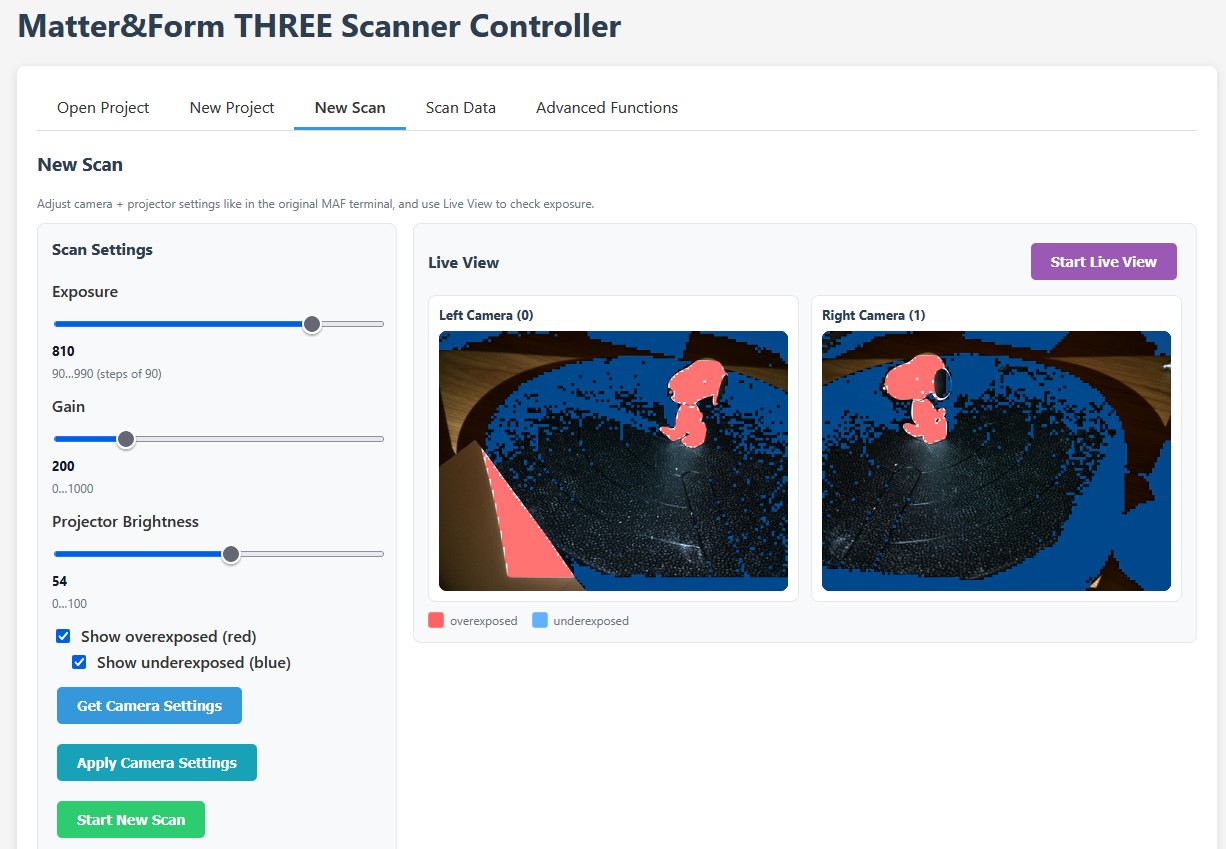
Thanks Drew! Very useful information.
I am making some good progress with API control: