HDR to improve texture quality


  • I got my hands on MAF3 scanner view days ago.

    It's really extremely easy to use the scanner.

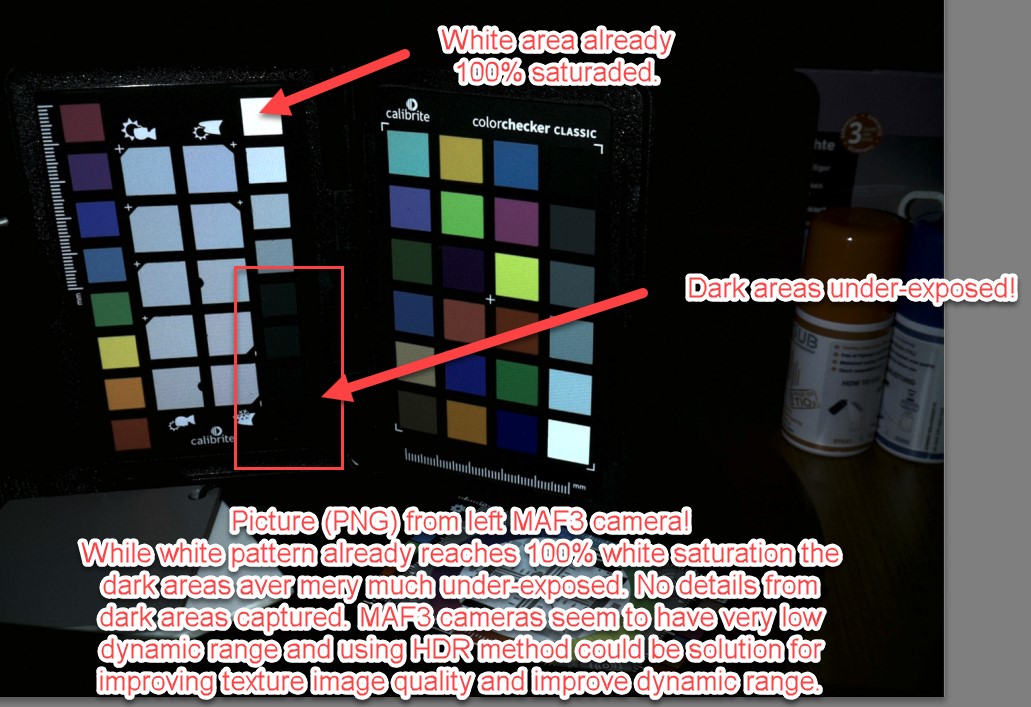
    However i am missing some advanced features which would boost the device performance to get much more out of the MAF3 device. Regarding texture quality the MAF3 cameras have quite low dynamic range. On objects which contain light (white) and dark (black, grey, brown) colors it's impossible to find exposure settings which fits for both .... light and dark area. While white areas are already reaching 100% white saturation the darker areas are completely under exposed and no details captured. Because of this HDR would be needed to increase the dynamic range of MAF3 cameras.
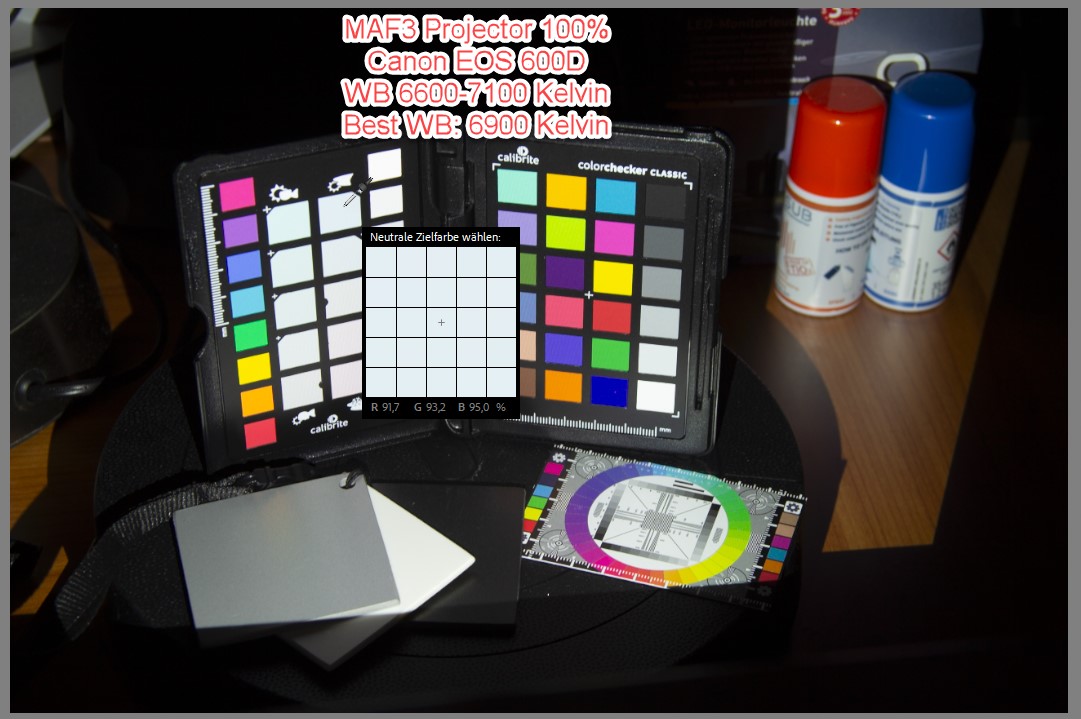
    Just for comparison, the same scenery with same lightning conditions taken with 14 years old DSLR. Unedited iimage.

    Lights and darks are exposed pretty well and even dark areas showing lot of details.
     

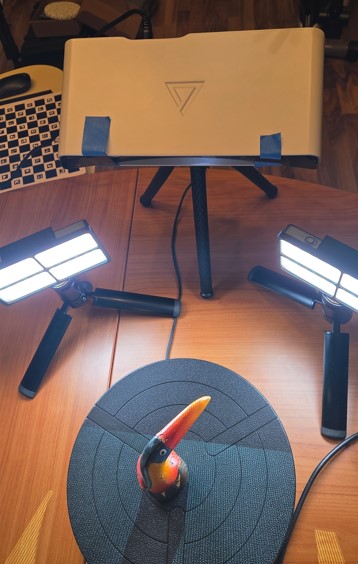
    For some poc testing i captured 3x images with MAF3 device with external lightning and cross polarized filters to reduce reflections. HDR based on: Normal/Under/Over-Exposed.

    Cross polarization is other hot topic and i might open another thread for discussion on this.
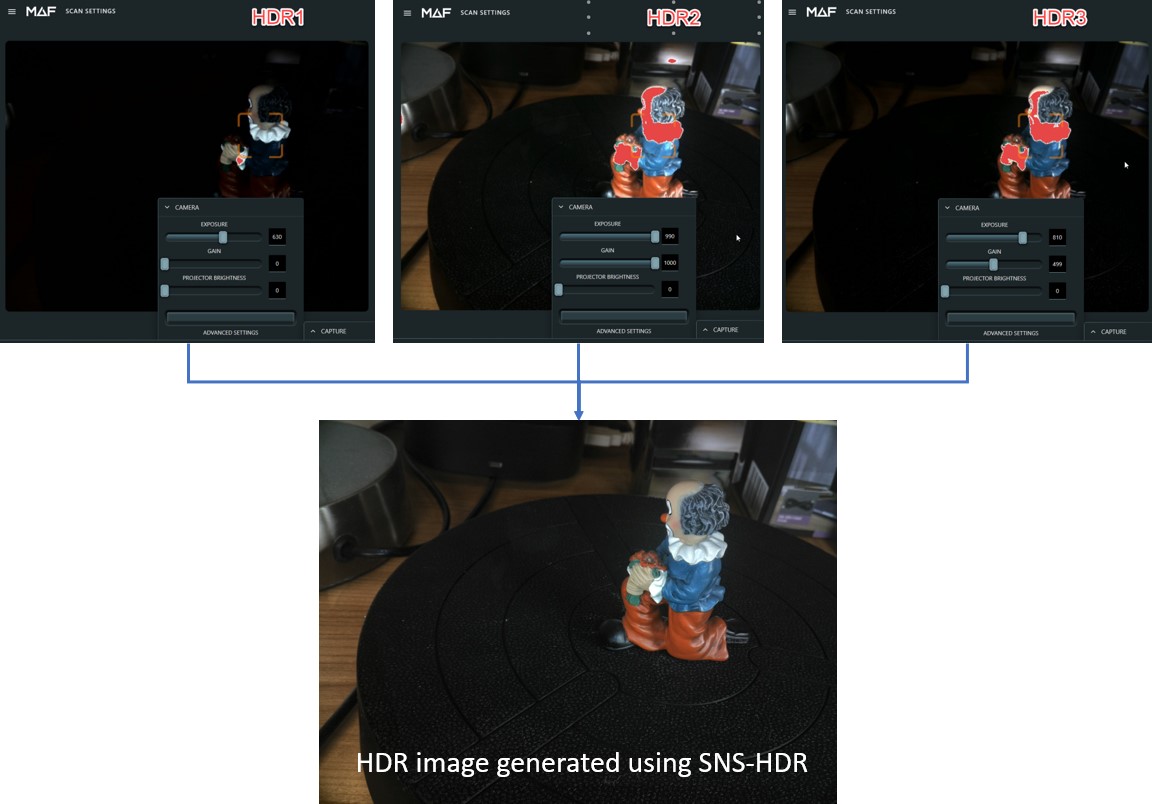
    The texture images from MAF3 have been exported to manually create HDR image.

    And this HDR images have then been replaced with normal texture images from MAF3 device.

    The resulting HDR image speaks for itself. Light and dark areas are pretty well exposed and even lot of details visible in dark areas.
    Here the comparision between normal out of the box method VS HDR method.
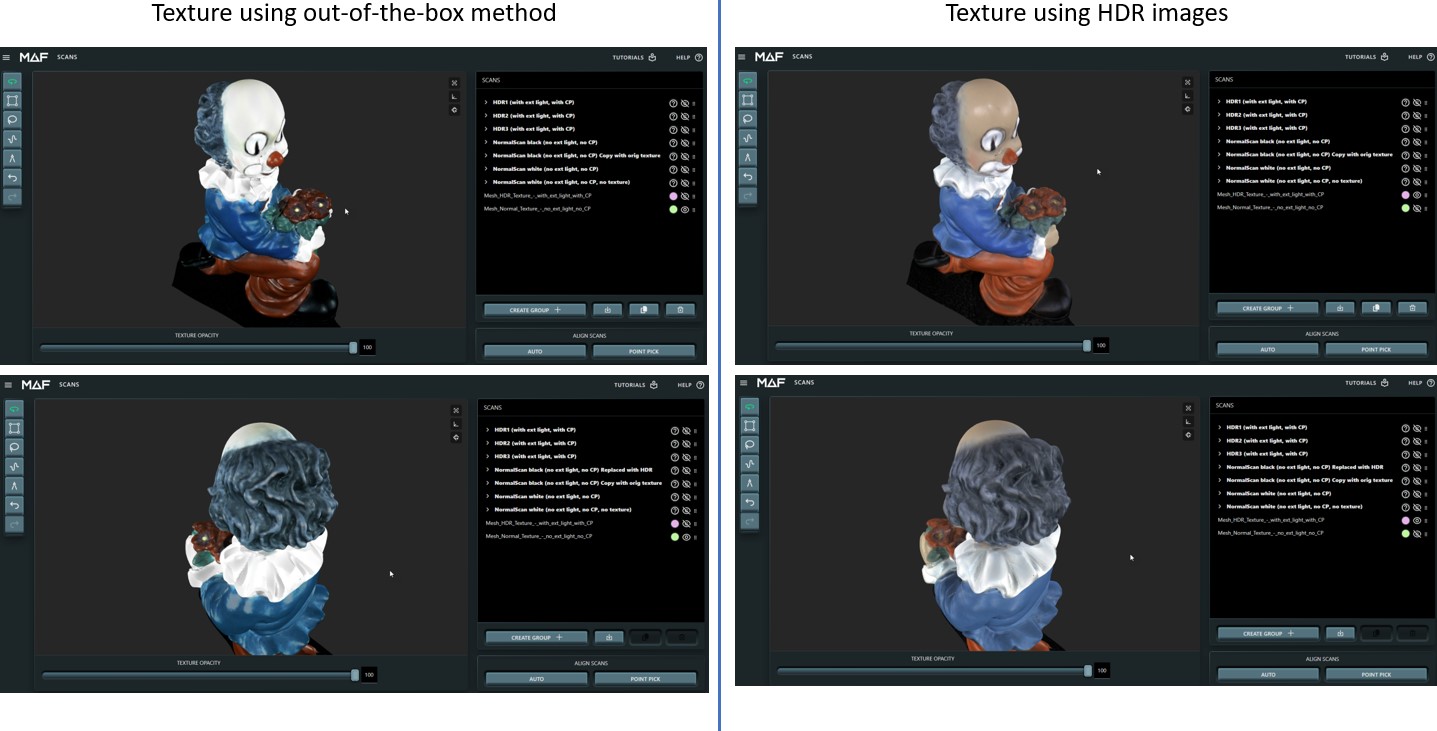
    It's lot of manual effor to capture HDR images seperately, export, post-process, import again on MAF3 device.

    Because of this all the HDR processing (picture capturing + HDR image processing) should be automatically done on the MAF3. This request is just of the texture but it would also make sense for the point cloud capturing.


  •  

    Nice work!

    As someone with a professional photo/video background, I am happy to see this post. 

    While we have to remember that the cameras used in 3D scanners are video oriented, rather than photo oriented, it never hurts to strive for improvement. 

    One of the limitations of the THREE is the single light source. I am hoping that there is some way to drive at least two softened lights or flashes in the future for the image capture portion of a scan using the wireless capabilities for triggering on and off.  Having better, more evenly distributed lighting would help ennormously.


  • Thanks Tom for your feedback!

    I have also tested with external light but also here the low dynamic range of the cameras does not allow to find one good exposure setting for light and bright areas. Either light area is overexposed or dark area is underexposed. The only practial solution to get perfect texture images with MAF3 cameras seem to be using HDR technology. And it's proven to work based on above shared example. Everything is based only on SW and implementation is "just" a sequence of commands to automatically capture 3x images (normal/over/under-exposed) and post-processing to generate HDR image. OpenCV does a pretty good job on this.

    Another drawback of current implementation is that same exposue setting is used for point cloud capturing and texture. I would love to have the option for different exposure setting for point cloud capturing and texture, also allowing to switch off the projector for texture capturing (e.g. using external light). For point cloud capturing user might want to change the settings for dark and light areas but for the texture it should be always the same for entire project to get harmonious light conditions.

    Another reason to use external light and switch off the projector for texture capturing is because of the grid pattern caused by the projector.
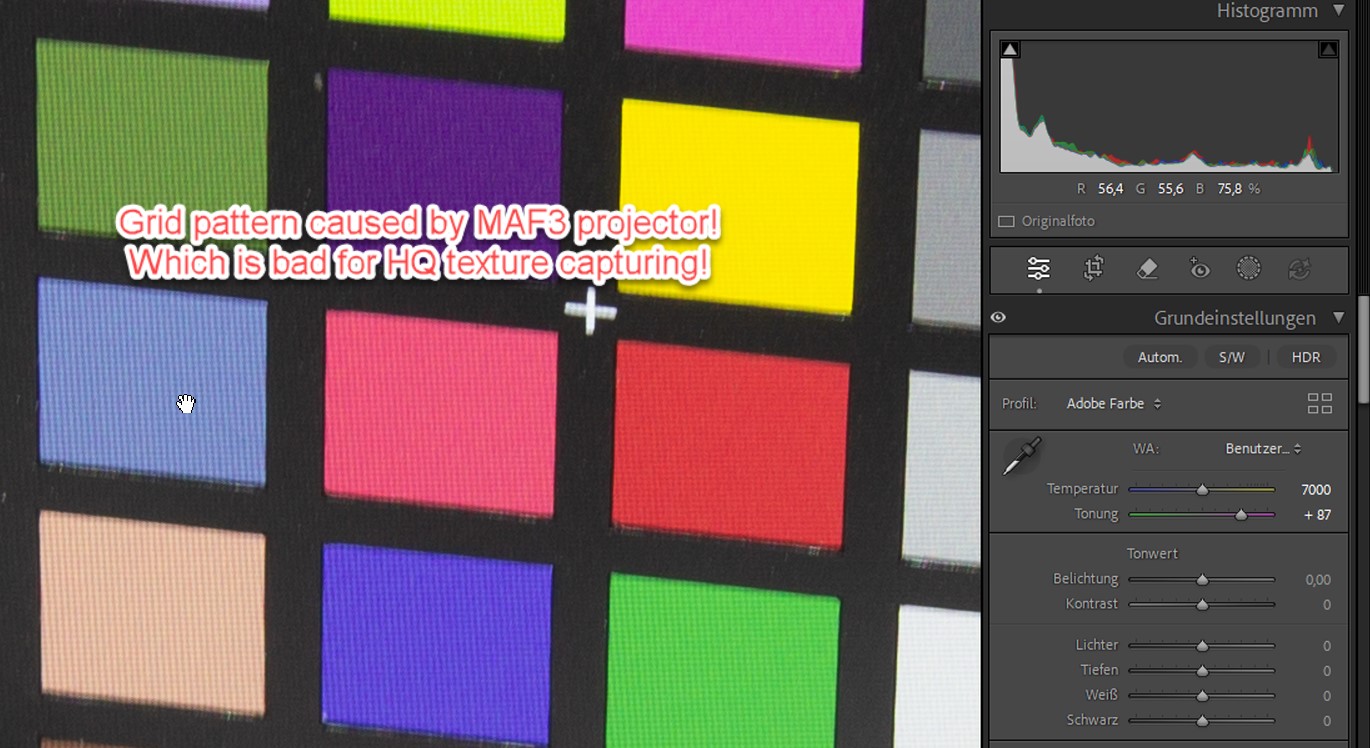
    Looking forward to your reply indicating the intention to improve later SW in this regard.


  • I think I have worked with Moment of Inspiration scanners for almost a decade.  If any team listen's more to their base, I can't think of one.  But, development is necessarilly iteritive, tackling the most important aspects of capture first and foremost.  They have it the nail on the head with the THREE when it comes to giving us the tools to capture shapes accurately and align scans easily,  The next logical step is to improve texture color and that includes better lighting options for the texture capture aspects of scanning.  Whether that can happen in this model, or a future hardware release is unknown to us.

    Remember, your Canon camera has a very sophisticated dedicated hardware image processor built into the system.  I have owned Canon cameras, both consumer and full frame professional, for almost 20 years and have seen signiicant improvements in their digital image processors over that long span.  

    I do wish that we could save textures in RAW format so that post processing textures could be more controllable.


  • As a first step MAF3 should be improved by updating the software. It will be great for existing users and also make the device much more attractive for new customers.

    To improve texture quality from MAF3 there are mainly 3x options:

    1. Improve MAF3 software using existing method without external lightning (use projector)

    2. Use external lightning with in-build cameras, also for this MAF3 SW needs to be improved.

    3. Use external camera (e.g. DSLR, any other camera extension) to map those images to the scanned model. It would be needed to calibrate the shift between internal and external cameras or detect points on the image from internal and external camera. This would be the non-plus ultra solution but this will be mainly based on SW.

    What's absolutely necessary to me for using the in-build cameras from MAF3 would be:

    • Independent exposure settings (exposure, gain, projector brightness) for point cloud scanning and texture images. 
    • Support for HDR capturing with option to configure 3x different exposure settings (exposure, gain, projector settings). People using external light solution might want to set projector brightness to zero.
    • Lock white balance for texture capturing (disable auto white balance). When using projector it should be set to about 6900K and when using external light (photo box) the white balance should be configured according to light used. 

    Best would be if MAF would implement such SW improvements in upcoming releases. 

    BTW ... is there any possibility to use own makros on MAF3 to automate scanning and textue capturing?


Please login to reply this topic!
